Where Do You Secure an AI Agent? Seven Approaches Compared
MDM, proxies, LLM and MCP gateways, API controls, and hooks each see part of what an AI agent does. See where each stops and why the endpoint matters.
The Neo Team

There are at least seven places to put a security control in front of an AI agent. Each one watches from a single spot, and that spot decides what it can see and what it can stop. This post runs all seven against the same attack and makes the case for the endpoint.
Key Takeaways:
- Every AI agent control sits in one place, such as the network, the browser, the model API, or the agent's own config, and only sees what passes through that place.
- Most of a real agent attack happens on the laptop: reading files, changing settings, running commands. Network and API controls never see those steps.
- A sensor on the endpoint sees the agent, the tools it loads, and the actions it takes, and can block an action before it runs.
Agents act now, and most controls were built for software that waits
A coding agent edits files, runs shell commands, loads tools, and keeps going until the task is done, often without anyone confirming each step. Every major coding agent has a mode for this. Claude Code calls it bypass permissions mode, which "disables permission prompts and safety checks so tool calls execute immediately." Cursor calls it Run Everything. Codex CLI has a flag named ‑‑yolo. Two of the three tell you to use it only in an isolated environment.
Gartner expects 40% of enterprise applications to include task-specific AI agents by the end of 2026, up from under 5% in 2025. The security market has responded by adding AI controls to products it already sells: proxies, browser extensions, mobile device management (MDM), and API and LLM gateways. Each of those sees part of what an agent does. None of them sees all of it.
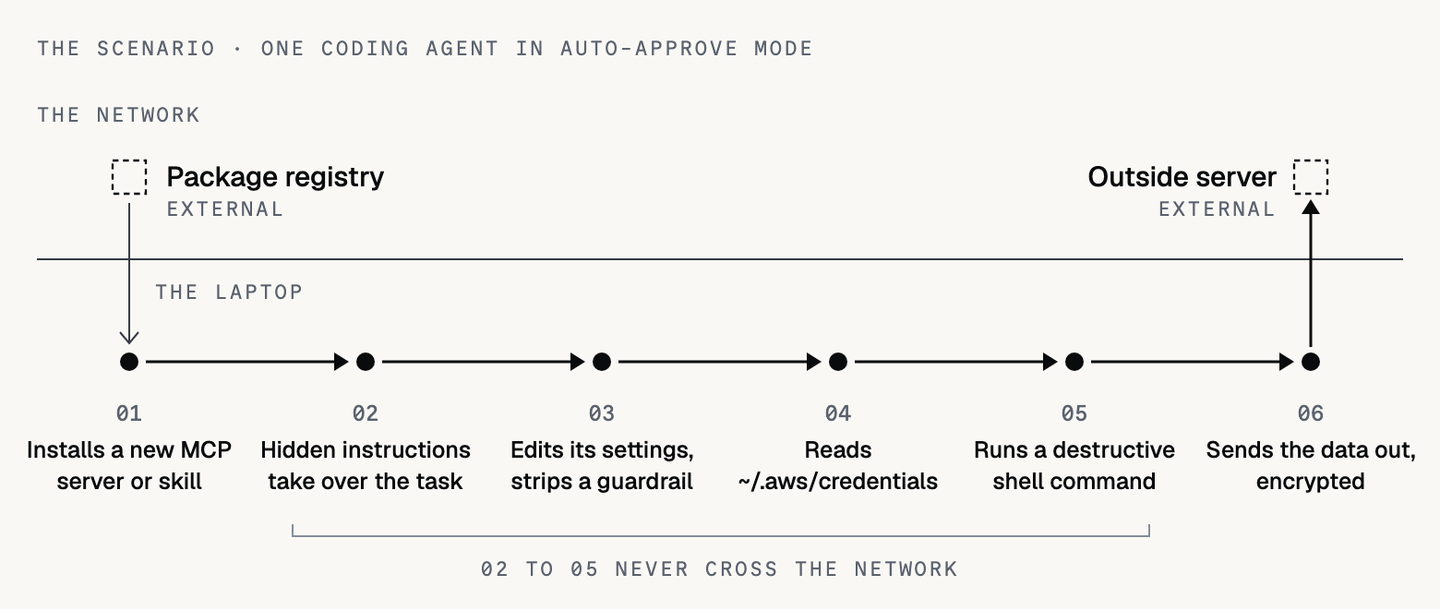
Here is the scenario we will use throughout. A developer's coding agent, running in auto-approve mode, installs a new Model Context Protocol (MCP) server or skill. The package contains instructions the developer never sees but the model reads and follows, a technique Invariant Labs documented as tool poisoning. Acting on those instructions, the agent edits its own settings file to remove a guardrail, reads ~/.aws/credentials (a file AWS stores in plain text), runs a destructive shell command, and sends what it found to an outside server, encoded so inspection misses it.
Every step in that chain has already happened in the wild. In the Nx npm compromise of August 2025, malicious code drove locally installed coding agents, with their permission-skipping flags on, to search for SSH keys and .env files. According to Wiz, it worked in hundreds of cases. In April 2026, a coding agent at PocketOS deleted a production database, along with the backups stored next to it, in 9 seconds.
Each approach below is judged against this chain: which steps it can see, and which it can stop.
What to measure before you compare
Every vendor can check every box on a feature list, so feature lists won't tell you much. Two questions matter more. How much of the agent can the control see, and can it step in before the damage is done?
Visibility
A control can only govern what it can see, and much of what an agent does never leaves the laptop.
- Discovery. Every agentic component on the device, from desktop apps and CLIs to extensions, local MCP servers, skills, and local models.
- Blast radius. What each agent can reach: the servers it loaded, the permissions it holds, and the files, credentials, and SaaS tenants within that reach.
- Attribution. Whether a person or an agent took the action, traced from the human to the agent to the process to the action.
Enforcement
Logging an action after it happens doesn't prevent anything. A control has to make its decision before the action runs, and it has to keep working when someone tries to turn it off. Each approach is scored on three enforcement criteria:
- Inline enforcement. A decision to allow, block, or hold for approval before the action executes, including actions that never leave the machine.
- Universal and always on. Works across every agent vendor, on or off the corporate network, with data staying on the device.
- Tamper resistant. An insider or a hijacked agent can't disable it, edit it, or route around it.
Discovery is the hardest of the six, because the components that matter most tend to stay on the machine. A Snyk scan of nearly 10,000 developer environments found just over half had at least one MCP server installed. A local MCP server talks to the agent over standard input and output as a subprocess, so it never generates network traffic.
Where each approach stops, by design
1. MDM inventory scripts
Most teams already have this. Jamf and Microsoft Intune run a script on a schedule and report what they find. The default inventory policy in Jamf runs weekly. The discovered apps report in Intune refreshes every seven days, and Intune Remediations can run as often as hourly. Even at hourly, a script only captures what was installed at that moment. It won't catch an MCP server the agent loaded ten minutes ago.
Running the script more often isn't a free fix. Each run walks the file system for apps, extensions, and config files, and on a busy developer laptop that costs CPU, disk I/O, and battery. Push the interval down far enough and developers start to notice, so most teams settle for a gap of hours or days between snapshots.
Scenario verdict: The script finds the agent at its next scheduled run. By then the credentials are gone.
2. Browser extensions
For AI used in a browser tab, an extension is the right tool. It can inspect a prompt before it's submitted, warn the user, redact a pasted secret, and push sign-ins to the corporate account. Neo uses a browser extension for exactly this.
But the browser is a small part of where agents run. Command-line tools (CLIs), software development kits (SDKs), IDE assistants, desktop apps, and local MCP servers all run as native processes, with no browser session for an extension to look at. On its own, an extension covers web chat and little else.
Scenario verdict: The agent runs in a terminal. The extension never sees it.
3. Network proxies and SSE
Proxies, secure service edge (SSE), and firewalls are already in place at most companies. They block known AI domains, log who went where, and inspect traffic when transport layer security (TLS) inspection is turned on. A proxy can also limit sign-ins to approved tenants using headers that Microsoft Entra, Google Workspace, and ChatGPT Enterprise support.
The limit is what a proxy can actually observe: a destination and a device. It has no idea which process made the call. Apps that pin certificates break under TLS inspection, so SSE vendors advise exempting them. In practice, that means the AI vendor's own desktop app passes through the proxy uninspected.
Tenant headers only work for vendors that support them, on managed devices, with pinning exceptions in place. If the proxy or SSE client isn't in the path, nothing gets inspected at all. And a local file read or a destructive command never touches the network in the first place.
Scenario verdict: The proxy might catch the outbound connection, if it knows the destination and can inspect it. By then the credential read and the destructive command have already happened.
4. LLM gateways
An LLM gateway gets at the same traffic from a different angle. Instead of intercepting connections, you configure the agent to send its model requests to the gateway's address, usually by changing a base URL setting. The gateway forwards each request to the model provider and can inspect, log, redact, or block it on the way through.
Because the agent connects to the gateway on purpose, there is no TLS interception, no root certificate to push to every device, and nothing breaks because of certificate pinning. Operationally, it's cleaner than SSE.
The catch is that a gateway only knows what passes through the model conversation. It sees prompts, responses, and the tool calls the model asks for. It doesn't see what actually ran on the machine, skills loaded from disk, or an MCP server doing work on its own. The routing is also just configuration, which means it can be changed. An agent running in a container or virtualized environment may never pick up the host's gateway setting. The same gap applies to an SSE root certificate installed only on the host, and to vendor hooks configured on the host, which don't carry into WSL.
Scenario verdict: Routed through the gateway, it may see the poisoned tool description and the model asking to read the credentials file, after the model has already decided to. It can't see the read itself or the settings edit. Running in a container or WSL without the gateway setting, the agent is invisible to it.
5. API controls
Vendor compliance APIs and AI firewalls cover prompt inspection, logging, and eDiscovery for sanctioned tenants. OpenAI's Compliance Platform exposes workspace logs to security information and event management (SIEM) and data loss prevention (DLP) tools.
Anthropic's Compliance API does the same, and its documentation is upfront about the limit: the API "retrieves records after the fact." A newer inline hook, still in beta, can deny a prompt before inference.
These controls only cover tools that integrate with them, and the Cloud Security Alliance, citing industry surveys, puts unapproved AI use at eight in ten employees. They also stop at the conversation with the model. What the agent does on the machine afterward is out of their reach.
Scenario verdict: The conversation may be logged. The damage happens on the laptop, outside the API.
6. MCP gateways
An MCP gateway is a legitimate control point for the MCP traffic routed through it. It can allowlist servers, inspect tool calls, and log them. On its own, though, it covers less than it appears to. It only sees traffic that is configured to pass through it. A locally installed server runs as a subprocess and makes no network call to route. A server the agent pulls down at runtime isn't in the gateway's config. Skills, extensions, and built-in tools like file edits aren't MCP traffic at all.
Allowlisting by name doesn't settle the trust question either. The postmark-mcp package shipped 15 clean versions before an update added a single line that copied every email to an outside address.
Scenario verdict: If the server isn't routed through the gateway, the gateway can't see it. If it is, the gateway sees the tool calls and still can't stop the file read or the shell command.
7. Vendor-native hooks and harness controls
The agent vendors now ship the deepest controls available: hooks that run around each tool call, allow and deny lists, and managed settings. Hooks sit in the right place, inside the agent's tool-call flow. They have four limits.
- One vendor at a time. Four in ten developers run two or more agents.
- User-owned files. Claude Code reads hooks from settings files in the user's home directory and the project, and Cursor reads a hooks file from the same places. An admin-managed tier takes precedence over those files, but it has to be deployed separately for each vendor.
- Best effort, by the vendors' own description. An agent in bypass mode can write to its own configuration directory, and Cursor describes its run modes as "best-effort guardrails" "rather than a hard security boundary."
- No cross-agent record. Each vendor's logs only describe its own agent.
The underlying problem is that hooks are configuration. They live on the same machine as the agent, in files that the user, or an agent acting as the user, can edit or delete. Unless something outside the agent checks that the hooks are still in place and restores them when they change, removing them takes one file write.
Scenario verdict: Works where the agent supports hooks and the managed tier is deployed. A hijacked agent in auto-approve mode can edit the settings it reads from, and nothing outside the agent puts them back.
The scorecard
Comparison reflects typical deployments. Capabilities vary by vendor and configuration.
| Approach | Complete discovery | Blast radius | Attribution | Inline enforcement (local actions) | Universal and always on | Tamper resistant |
|---|---|---|---|---|---|---|
| MDM scripts | Partial | None | None | None | Partial | None |
| Browser extension | Partial | None | Partial | None | Partial | Partial |
| Network proxy | Partial | None | None | None | Partial | Partial |
| LLM gateway | Partial | Partial | Partial | None | None | None |
| API controls | Partial | Partial | None | None | None | Partial |
| MCP gateway | Partial | Partial | Partial | None | None | None |
| Vendor-native hooks | None | Partial | Partial | Partial | None | None |
| Neo | Full | Full | Full | Full | Full | Full |
Each alternative does one or two things well. None of them can block a local action before it runs, and none holds up against an insider or a hijacked agent, because each one sits somewhere the agent can route around or reconfigure.
Why the endpoint
The endpoint is the one place where the person, the agent, the tools it loads, and the actions it takes all show up together. The process tree shows which agent launched which tool. The file system shows what it read. The network stack shows where it connected, and the browser shows which account it used.
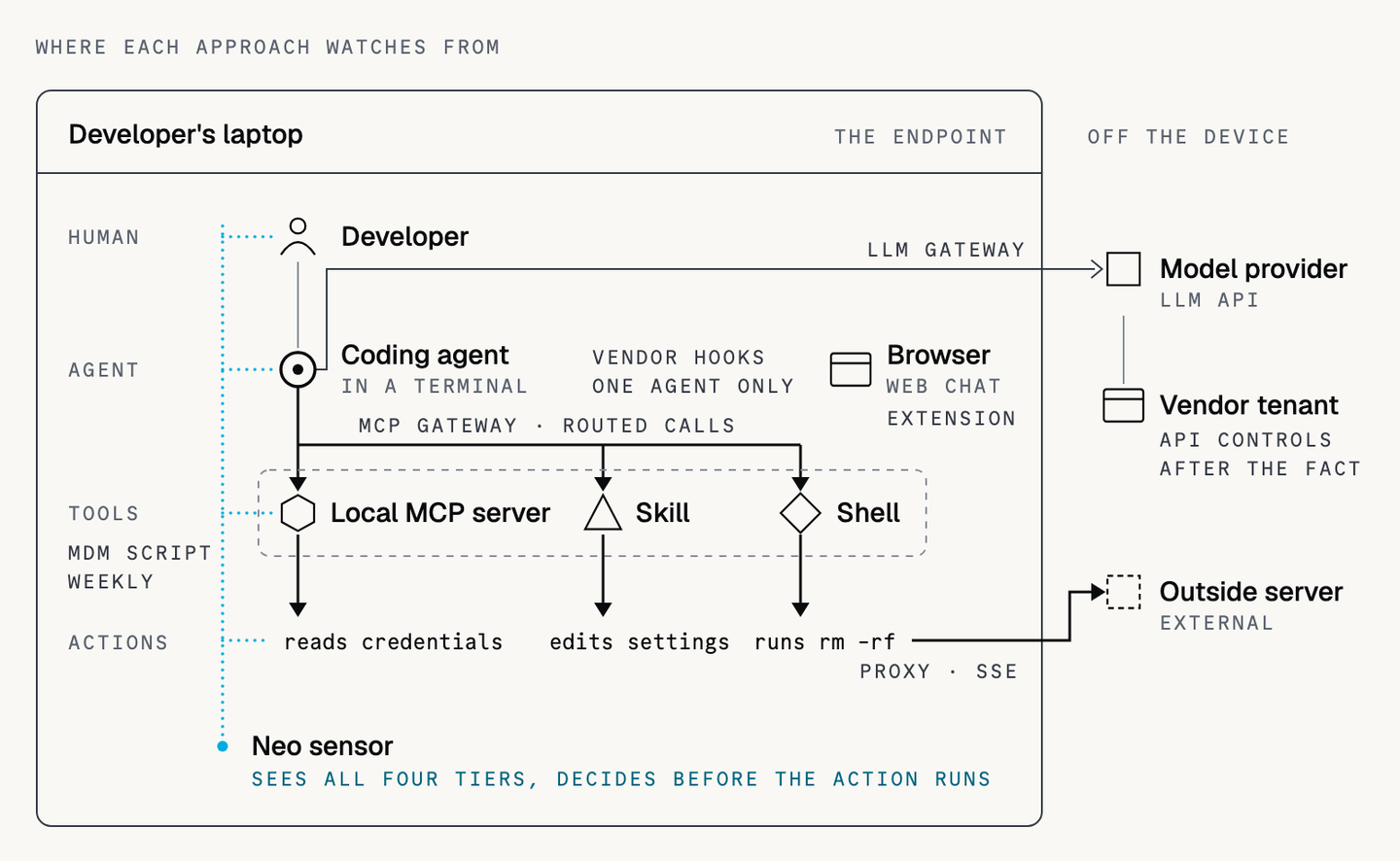
A credential read or an rm ‑rf never crosses the network. The only place to stop one is on the operating system, before it completes, with the option to allow it, block it, or ask a person.
The UK's National Cyber Security Centre makes the same point in its guidance on agentic AI: decide which actions an agent may take and when it must stop for approval, enforce that with technical controls, and do "not rely on prompting alone".
The scenario, replayed with a sensor
- The guardrail edit. Blocked. The policy doesn't live in a file the agent can write, and the Sensor runs underneath the agent.
- The credentials read. Blocked by a ringfence around ~/.aws/credentials and other credential files.
- The destructive command. Blocked, or held for approval, before it runs.
- Every event. Recorded as the agent's action, not the developer's.
How Neo closes the gaps
Neo is built endpoint-first. We started there because the endpoint gives the most complete view of what an agent does and the most reliable place to stop an action before it runs. It was also the hardest place to start. A sensor that watches processes, file access, and tool calls on a developer's laptop has to be light enough that nobody notices it running. If it slows a build or drains a battery, it gets in the way of the people it's meant to protect, and it won't stay installed for long.
One Sensor goes on each endpoint. It discovers every agent, CLI, SDK, IDE assistant, extension, MCP server, skill, and local model on the device. That includes components that never touch the network, configuration MDM doesn't look at, and software running inside WSL and containers.
It maps which agent loaded which tool and what permissions each one has. With identity provider (IdP) context, it shows who is running the agent and what it can reach. Posture checks flag auto-approve modes and overly broad permissions. The policy engine then decides to allow, ask, or block at the tool call, whether the device is online or offline.
The endpoint is the foundation, and Neo adds other layers on top of it: hooks inside coding agents, browser and IDE extensions, and API integrations with AI platforms. Each one adds context the Sensor can't get by itself. Hooks see each tool call in the agent's own terms, extensions see what happens inside a browser session, and API integrations bring in activity from sanctioned AI tenants. On their own, these controls have the gaps described earlier. Run alongside the Sensor, which deploys the local ones and protects them from edits, they add detail instead of carrying the whole load. Together, the Sensor and these layers provide:
- Inside the harness. Hooks the Sensor installs in coding agents and protects from edits by users and agents, plus the browser and IDE extensions it manages.
- API integrations. Connections to AI platforms that add tenant-level activity to what the Sensor sees on the device.
- Ringfencing. SSH keys, .env files, and cloud credentials.
- Inspection on invocation. Skills and MCP servers are inspected when they run, not only when they're installed.
- Allowlisting for all software. Not only AI tools, with personal and corporate accounts told apart.
- An audit trail. From human to agent to process to action, exported to your SIEM.
Want to see how your current stack handles this scenario? Get a demo and we'll run it against your environment.
FAQs
Is an MCP gateway enough to secure AI agents?
No. A gateway controls the MCP calls routed through it. It doesn't see locally installed servers, servers fetched at runtime, skills, extensions, or built-in tools, and it can't stop a local action. It works best as one layer, kept in place by an endpoint control.
What does an LLM gateway miss?
A gateway sees prompts, responses, and the tool calls the model requests, for agents configured to use it. It doesn't see what actually runs on the machine, skills or MCP servers acting on their own, or agents in containers and WSL that don't inherit the gateway setting.
Can a network proxy see what an AI agent does on a laptop?
Only partly. A proxy sees domains and devices, and inspects traffic where TLS inspection is on. It can't see which process made a call, a local MCP server, or anything that stays on the machine.
Do agent hooks replace an endpoint sensor?
Not on their own. Hooks run inside the agent's tool-call flow, which is the right place to enforce. But they cover one vendor at a time, live in files the user can edit, and keep no cross-agent record. A sensor manages hooks from outside the agent, protects them from edits, and covers agents that don't support hooks at all.
Get started
Put NEO to Work on Your Hardest Problem
Bring a use case. We will show you a working loop on your data in the first session.