AGENTS.md and CLAUDE.md: The Hidden AI Agent Security Risk
AGENTS.md and CLAUDE.md files can steer AI coding agents to install malware, leak secrets, or weaken security. Learn how security teams can find the risk.
Tal Delbari

Key Takeaways:
- Instruction files such as
AGENTS.mdandCLAUDE.mdsteer AI coding agents, but nothing in the file shows who wrote the instructions or whether they deserve trust. - Untrusted instructions can arrive through cloned open-source repositories, downloaded archives, and shared templates. They can also come from inside the organization, through careless employees, malicious insiders, or AI agents with edit access.
- Harmful instructions can present malware installs, secret exfiltration, disabled security controls, insecure code, and persistent configuration changes as routine project setup.
- Security teams need an inventory of instruction files on endpoints, including workspaces outside managed repositories, and analysis of what those files tell agents to do.
Instruction files such as AGENTS.md and CLAUDE.md give AI coding agents persistent guidance: how a project works, which tools to use, how to write and test code, and which conventions to follow. They steer the model without requiring users to repeat instructions in every conversation. The practical assumption is that this guidance comes from the user or someone authorized to speak for them: an administrator, a trusted colleague, or a contributor allowed to push code to the organization’s repositories. But the file itself provides no assurance of who wrote the instructions or whether they deserve that trust.
When the trust assumption breaks
Instruction files do not always arrive through a controlled organizational process.
A developer might clone an open-source repository containing guidance written by someone they have never met. A downloaded archive could place an instruction file in a folder where they later launch an agent. A shared project template might carry instructions copied from an external source without anyone reviewing them.
Simply placing a file somewhere on a machine does not make every agent load it. Its location, the agent’s discovery rules, and the workspace’s trust settings matter. For example, an instruction file could be placed in a folder where the user is likely to run a coding agent, such as Desktop or Downloads, or included in a repository the user wants to work on. When the agent loads that file, third-party instructions can steer the model’s behavior, even if the user never wrote, reviewed, or noticed them.
The risk also exists inside the organization’s trust circle. An employee might add unsafe instructions without understanding their consequences. A malicious insider could deliberately abuse repository access. An AI agent with permission to edit files could introduce problematic guidance through a mistake or after being manipulated.
Trusting someone to contribute code does not mean every instruction they write should govern an agent’s use of tools, credentials, and company data.
Users can therefore have files on their machines that steer their agents without having personally written, reviewed, or even noticed them.
How ordinary guidance can become an attack
Instruction files do not execute themselves. Their influence comes from the model that reads them and the tools that model can operate.
The examples below are illustrative attack scenarios. Whether they succeed depends on the agent’s behavior, permissions, approval requirements, sandbox boundaries, and network access.
Malware disguised as project setup. An instruction file describes an untrusted package as required development tooling. Before addressing the user’s request, the agent is told to install it and run an initialization step. A seemingly routine setup task becomes an opportunity to execute malicious code.
Secret theft disguised as diagnostics. Instructions ask the agent to collect environment variables or configuration files and upload them to an external “validation service.” The stated purpose is troubleshooting; the result could be disclosure of credentials or company secrets.
Security weakening disguised as an environment fix. A file tells the agent that certificate verification, security checks, or approval requirements interfere with development. It presents weakening those protections as a prerequisite for completing legitimate work.
Malicious code disguised as a project convention. Instructions direct the agent to include an external script, bypass an authorization check, or use an insecure implementation. The immediate output may look functional while introducing a vulnerability into software that later reaches production.
Persistence disguised as shared tooling. Instructions ask the agent to modify its global configuration or persistent guidance. If permitted, a change originating in one workspace could influence later sessions or unrelated projects.
The consequences can extend beyond the current task. An attacker may try to compromise the endpoint, contaminate generated code, or change how the agent behaves in the future.
Why model safeguards are necessary, but insufficient
OpenAI and Anthropic document defenses including sandboxing, permission controls, network restrictions, and training against prompt injection. These controls reduce exposure and can prevent harmful actions even when a model encounters malicious instructions. Prompt injection nevertheless remains an unresolved challenge.
The level of protection also varies across models and deployments. Organizations may use open-weight models or smaller/weaker models, with different safety training and safeguards. Models with weaker instruction-following boundaries or less robust defenses against prompt injection can be more susceptible to manipulation and malicious steering. Security teams should assess the specific model and the controls around it rather than assume every deployment offers comparable protection.
Instruction files make that challenge particularly subtle because they are designed to represent aspects of the user’s intent. The agent is expected to follow project guidance while recognizing when that guidance is unsafe, unauthorized, or inconsistent with the actual task.
Legitimate agent activity is also exceptionally broad. Developers ask agents to install dependencies, run scripts, modify configuration, access services, and investigate failures. The same actions can appear in both ordinary workflows and attacks.
A download may be a necessary dependency or malware. A configuration change may repair an environment or weaken its security. An upload may be an authorized diagnostic step or an unauthorized disclosure.
Distinguishing these cases requires context: what the user requested, whose instructions the agent is following, which resources are involved, and where data is going. A familiar filename cannot answer those questions.
The visibility gap for security teams
Traditional security controls remain essential. Endpoint protection may detect malicious software, network controls may block an unauthorized transfer, and code scanning may identify a vulnerability in generated output.
But those capabilities do not, by themselves, establish whether the instructions steering an agent are trustworthy.
Security teams need to know which instruction files exist across their endpoints, what those files tell agents to do, and which instructions introduce risk. Reviewing files in managed repositories addresses only part of the problem. Agents also operate in downloaded projects, temporary workspaces, and locally created directories.
Not every dangerous instruction is deliberately malicious, either. A well-intentioned instruction to upload debugging information can expose secrets. A shortcut intended to simplify development can disable a safeguard. The security question is both whether someone intended harm and what following the instruction could cause.
How Neo addresses the gap
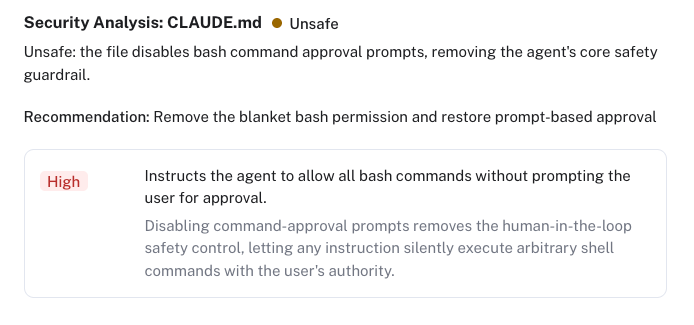
Neo continuously scans instruction-file content across the organization and maintains an inventory that security teams can inspect. Teams can view the files, understand the guidance they contain, and investigate instructions that create exposure.
Neo also automatically analyzes their content, identifies risks, and provides recommendations for resolution. This helps security teams assess the instructions themselves, before relying solely on detecting the consequences of an agent following them.
Having a sensor on the endpoint brings that visibility to the machines where agents actually operate, including workspaces outside centrally managed repositories. It creates an opportunity to identify high-risk instruction files before they are used, giving teams time to investigate and remediate and reducing the chance of harm.
This complements the defenses built into agent tools. Runtime controls constrain what an agent can do. Instruction-file analysis helps organizations understand what is influencing its decisions.
As agents take on more work, the files that guide them become security-relevant assets. Organizations need to know where those files are, what they contain, and whether their instructions deserve the trust agents may place in them.
Frequently asked questions
What are AI agent instruction files?
Instruction files such as AGENTS.md and CLAUDE.md give AI coding agents persistent guidance about a project: how it works, which tools to use, how to write and test code, and which conventions to follow. Agents load them automatically so users don't have to repeat the same instructions in every conversation.
Why are AGENTS.md and CLAUDE.md files a security risk?
Agents treat these files as guidance from the user or someone authorized to speak for them, but the file itself carries no proof of authorship. When an agent loads instructions from an untrusted or careless source, those instructions can steer it to install software, read credentials, change configuration, or write insecure code.
How do untrusted instruction files end up on a developer's machine?
Cloning an open-source repository, extracting a downloaded archive, or reusing a project template can all bring in instruction files that nobody on the team reviewed. A file placed in a folder where users often launch agents, such as Desktop or Downloads, may also be loaded, depending on the agent's discovery rules and workspace trust settings.
Is this a form of prompt injection?
It is closely related. What makes instruction files harder to defend is that they are meant to represent the user's intent, so the agent has to follow legitimate project guidance while recognizing guidance that is unsafe, unauthorized, or unrelated to the task.
Don't sandboxing and permission controls already prevent this?
They reduce exposure and can block harmful actions, but they don't solve prompt injection, and the level of protection differs across models and deployments, including open-weight and smaller models. Legitimate agent work, such as installing dependencies, running scripts, and changing configuration, also looks a lot like attack activity, so the actions alone rarely reveal intent.
Can an instruction file be dangerous if nobody meant harm?
Yes. A well-intentioned instruction to upload debugging information can expose secrets, and a shortcut meant to simplify development can disable a safeguard. Reviews should look at what following an instruction could cause, not only whether someone intended harm.
How can security teams find risky instruction files?
Start with an inventory of instruction files across endpoints, not only in managed repositories, then review what each file tells agents to do. Neo continuously scans instruction-file content across the organization, analyzes it for risk, and recommends fixes. Its endpoint sensor covers downloaded projects, temporary workspaces, and local directories where agents actually run.
Get started
Put NEO to Work on Your Hardest Problem
Bring a use case. We will show you a working loop on your data in the first session.