Tamper Protection for AI Agents Security
Neo’s Tamper Protection keeps policy in force inside Claude Code, Cowork, Codex, Cursor, and Copilot, even when someone deletes or edits a hook.
The Neo Team

Key takeaways:
- With Tamper Protection, Neo restores its own hooks across popular agent harnesses when a user or an agent tries to delete or edit them.
- Unlike script and MDM-delivered hooks, which go unwatched between pushes, Neo’s hooks are checked on the device and restored as soon as they change.
- Tamper Protection repairs only Neo’s own hooks and runs in the existing Neo sensor, with nothing new to deploy.
Neo governs AI agents from the inside. Claude Code, Claude Cowork, Codex, Cursor, and Copilot all expose hooks, points where a security tool can see what an agent is about to do and decide whether it happens, before a file is read, a command runs, or a tool is called. Neo installs hooks in each agent it governs, and those hooks are how its allow, block, and human-in-the-loop policies reach the agent’s tool calls.
That design raises an obvious question: what happens if someone removes the hook? A hook is configuration on the device, and anyone, or any agent, with write access to that configuration can remove it. Sometimes that’s deliberate: a developer who wants an unrestricted session, a Cowork user who finds a policy inconvenient, or an insider looking for a way around controls.
Sometimes it’s a model mistake. An agent working through a task can overwrite a settings file, reset a configuration, or clean up files it decides it doesn’t need, and take the hook with it without meaning to bypass anything.
An enforcement point that the person or agent it governs can switch off, on purpose or by accident, isn’t much of an enforcement point. Neo is built on that premise, so protecting its own hooks is part of how it enforces policy. That protection is called Tamper Protection, and today it covers the hooks Neo installs in each agent.
How Tamper Protection works
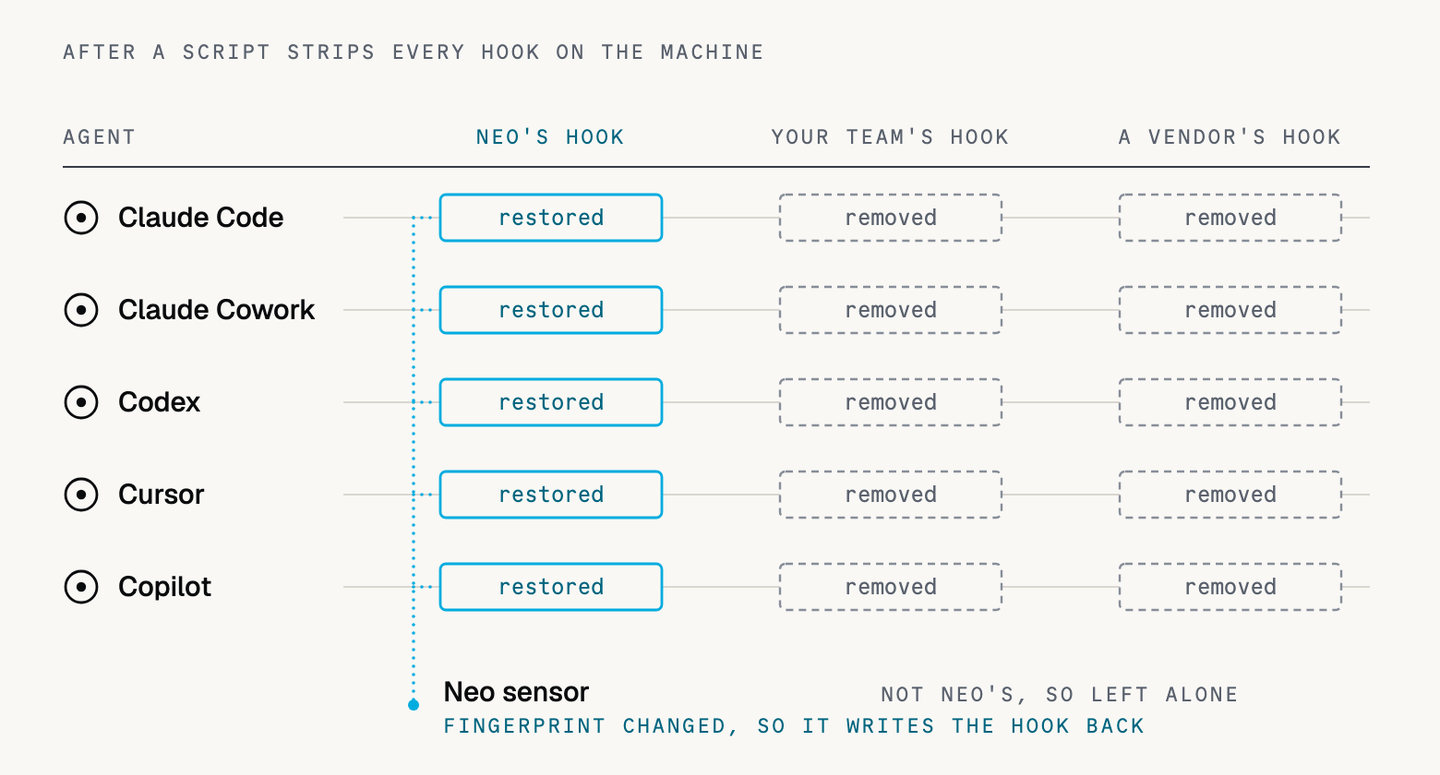
When Neo installs a hook, it records a fingerprint of the file. The sensor compares each hook against that fingerprint instead of reacting to every file event on the machine, so Neo’s own writes and ordinary system activity don’t set it off. A real change to a Neo hook does, and the sensor immediately writes the correct version back.
A few properties define how it behaves:
- Persistent through deletes and edits. Removing or changing a Neo hook doesn’t take an agent out of policy.
- Consistent across agents. It covers Neo’s hooks in Claude Code, Claude Cowork, Codex, Cursor, and Copilot.
- Scoped to Neo’s hooks. Neo repairs only its own hooks and leaves your other hooks and other vendors’ hooks, alone.
It all runs in the Neo sensor, with nothing extra to deploy.
Why the endpoint delivery model is advantageous
How a hook gets onto a device shapes how well it holds up. Many AI security tools install their hooks with a script or ride along on an MDM configuration push. The script runs once and exits. The MDM profile reapplies on its own check-in schedule. Between those moments, no process on the device is watching the hook, so any person or agent that can edit a config file can remove enforcement and keep working until the next push, if one comes at all.
EDR products have long protected their own agents from tampering. But EDR protects its own process, and the hooks inside a third-party AI tool’s configuration sit outside that boundary. Prompt- and API-layer tools have no presence inside the agent at all, so there’s no enforcement point on the device for them to defend.
Neo runs on the endpoint, inside the tool-call flow of the agents it governs. The same position that lets Neo decide what an agent can do lets it keep that decision in force when someone tries to pull it out.
Seeing it in practice
The clearest way to understand Tamper Protection is to try to defeat it. Run a script that strips every hook on the machine, then look. Neo’s hooks are in place. Everything else the script removed is gone.
What it means for you
- Keep policies in force when a user or an agent deletes or edits the hook that enforces them, whether on purpose or by mistake.
- Close a common bypass that leaves script- and MDM-delivered hooks without enforcement.
- Protect enforcement without breaking workflows, since Neo touches only its own hooks and never the ones your teams rely on.
See Neo in action
Want to see Tamper Protection on your own endpoints? Talk to us today.
FAQs
Will Tamper Protection overwrite our own hooks or another vendor’s?
No. Neo repairs only the hooks it installed. It never modifies hooks your teams wrote or hooks from other security tools, and it won’t restore them if they’re removed.
Do I need to deploy or configure anything to use it?
No new deployment is needed. Tamper Protection runs in the Neo sensor already on your endpoints.
Get started
Put NEO to Work on Your Hardest Problem
Bring a use case. We will show you a working loop on your data in the first session.