Neoverse, the intelligence layer for AI apps and tools, is now publicly available.
Look up an MCP server, agent skill, desktop app, or browser or IDE extension in Neoverse and see its security verdict. Free with email sign-in.
The Neo Team

Key takeaways:
- Neoverse, the security intelligence engine for agent skills, MCP servers, desktop apps, and browser and IDE extensions, is now open to the public.
- Each profile shows a security verdict and its key finding, based on static, runtime, and documentation analysis plus threat intelligence.
- Inside the Neo platform, the same research drives what gets blocked on customer endpoints and helps keep Neo’s sensor current.
Across Neo customer environments, we watch the same pattern play out every day. A developer finds an MCP server that connects their coding agent to the team’s ticketing system and installs it with one command. A colleague adds a browser extension that promises AI summaries. Agent skills get copied from a GitHub repo into a config folder and run the next time the agent starts. None of it waits for a review, and most of it never reaches the security team.
When our customers were faced with this challenge, they hit the same wall. Marketplace pages show ratings and install counts, which tell you an app is popular, not what it does. And the app approved last month isn’t necessarily the app running today. We routinely see an update give a familiar extension the ability to read files or call other tools, with no new install for anyone to notice.
Starting today, anyone can sign in to Neoverse and look up the security verdict for an MCP server, agent skill, desktop app, or browser or IDE extension before it reaches their machine. It’s built on the same research Neo customers rely on, now open to every team dealing with this problem.
Introducing Neoverse
Neoverse is our software intelligence engine for AI software and apps, and it now has a public catalog where signed-in users can search, filter, and open researched profiles of AI applications.
Key capabilities include:
- A searchable catalog of 4M+ AI software apps. Agent skills, MCP servers, desktop apps, browser extensions, and IDE extensions, each with its publisher, category, description, ratings, installs, and source links where available.
- A verdict and the reason behind it. Each analyzed app is marked Malicious, Unsafe, or Safe, with the headline finding that drove the verdict.
- Summaries and version history. See what an app is for and how it has changed between versions.
- Free access with email sign-in. Free accounts include the verdict, key finding, and summary for each analyzed app, with full details available on request. Neo customers get full findings, supporting evidence, capability analysis, threat intelligence, and API access.
How it works
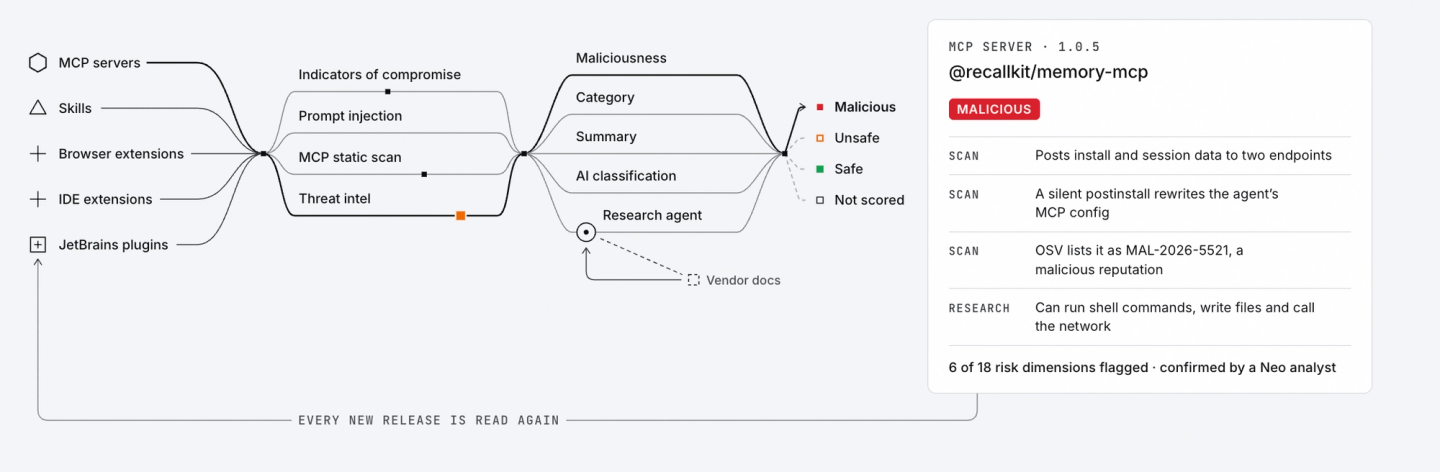
Neoverse finds software in two ways. Crawlers pull new apps and versions from the places developers get them: IDE marketplaces for VS Code, JetBrains, Cursor, and Windsurf; skill and MCP sources such as GitHub and the MCP registry; the Chrome, Edge, and Firefox web stores; and OS package managers such as Homebrew, Winget, and Chocolatey. For Neo customers, the Neo sensor also reports software it finds on endpoints, so apps that never appear in a public marketplace still get researched.
Neo’s research agents then analyze each app three ways. Static analysis covers binaries and non-binaries, from desktop app executables to the scripts, manifests, and instruction files behind skills and MCP servers, checking each for malicious code, hidden instructions, vulnerable components, and risky permissions. Runtime analysis runs the app in a sandbox and watches what it does. Documentation analysis checks that behavior against what the app claims to do. Neoverse adds external threat intelligence and CVE and GitHub Security Advisory data, then repeats the work for every new version.
Along the way, it maps what each app can reach (files, shell commands, credentials, network, the browser) and whether its AI only produces content, acts with approval, or acts on its own. All of that rolls up into one verdict:
- Malicious: evidence the app behaves like an attacker, such as stealing credentials. Sometimes that only shows when several behaviors are seen together.
- Unsafe: genuinely risky, but not an attacker, such as undisclosed telemetry to the vendor’s servers or a serious vulnerability.
- Safe: no risks were found.
How teams vet AI applications today
Most security teams rely on some mix of three approaches. Manual review is thorough, but it can’t keep pace with one-click installs and rarely gets repeated when an app updates. Marketplace signals like ratings and verified publishers help flag obscure or abandoned projects, but they measure popularity, and a widely installed extension can still ship an update that adds credential access. Vulnerability scanners catch known CVEs in dependencies, but they aren’t built to notice a skill with hidden instructions or an MCP server sending data somewhere it never disclosed.
Neoverse compares what it finds in the code with what the app does when it runs and what it claims to do, on every release. The verdict comes with evidence a security team can check, a stronger basis for a decision than a vendor’s attestation or a star rating.
How Customers Benefit from Neoverse
The public catalog is the part of Neoverse anyone can see. Inside the Neo platform, the same research does two more jobs.
First, it connects discovery to enforcement. Neo’s sensor runs on the endpoint, where agents actually act, and finds the AI software on each device, binaries and non-binaries alike: agents, desktop apps, extensions, MCP servers, and skills. Neoverse tells the console what each one is, what it can reach, and what risk it carries. When Neoverse marks a skill as malicious, Neo flags it in the console and blocks it on any endpoint where it shows up, without anyone writing a rule for that skill. Today that blocking covers skills and MCP servers, and we’re extending it to more types of software. Customers can also set monitor or block policies on the evidence itself, such as an AI feature that acts without approval. Because every update gets re-checked, those policies keep up with the software.
Second, and longer term, Neoverse keeps Neo itself current. AI agents change fast. A new release might store its configuration differently, and the way Neo hooks into that agent has to change too. Neoverse already produces the structured data our sensor relies on, including agentic configuration rules, event normalization rules, and injection engine configurations. Our goal is for Neoverse to notice the new version, research what changed, and deliver updated configuration to the sensor without waiting on a manual research cycle.
That’s why Neoverse runs continuously. Every app it analyzes improves the public catalog, the verdicts customers enforce, and the sensor that enforces them.
Bottom line for security teams vetting AI applications
With Neoverse, security and IT teams can:
- Spot new AI applications sooner, including familiar apps that just gained AI capabilities, without starting a manual review.
- Investigate with evidence, with customer access to full findings, supporting excerpts, capability analysis, and threat indicators such as associated domains.
- Catch risky updates, since each new version is re-checked for added capabilities, new CVEs, or malicious behavior.
- Pull the analysis into other systems through API access for Neo customers.
Get started
Neoverse is available today. Anyone can sign up with their email to search the catalog and see verdicts, key findings, and summaries.
Neo customers sign in with their existing Neo account to see full findings, evidence, capabilities, and threat intelligence. To request full details on an app, or for deeper analysis or API access, contact sales@neo.ai or your account team.
Frequently asked questions
Is Neoverse free?
Yes. Anyone can sign up with their email, search the catalog, and view the verdict, key finding, summary, and version history. Full details for a specific app are available on request, and Neo customers get full findings, evidence, capability analysis, threat intelligence, and API access.
Does signing up for Neoverse protect my endpoints?
No. The public catalog is a research tool. Discovering AI applications on your devices and enforcing policy on them is part of the Neo platform, which uses Neoverse verdicts to make those decisions.
What if an app isn’t in the catalog or has no verdict?
Coverage and analysis depth vary by app, so some profiles may show an unknown verdict or missing details. Neo customers can also have Neoverse analyze their own custom software, such as internal skills.